Why This Poster Should Feel Like an Agreement
Most students start by copying rules from a website, and the page ends up looking like an official notice. An internet pact handout works better when it sounds like an invitation: the writer is asking classmates to sign on, and that is what makes people read it. Before drawing anything, decide who will read it, where it will hang, and one small action you want readers to take, such as signing, ticking a box, or reminding a deskmate.
Choosing and Rewriting the Clauses
The national youth internet civilization pact is the most common source for this topic. Pick four or five lines that connect to real student life, then rewrite them in first person so they sound like a promise.
- I will use the internet to learn and stay away from harmful content.
- I will talk politely online and never insult or trick anyone.
- I will protect myself and not meet strangers I only know online.
- I will keep the network safe and not break its rules.
- I will stay healthy and not lose myself in screens.
Short first-person sentences are easier to memorize and much easier to write neatly in a small space.
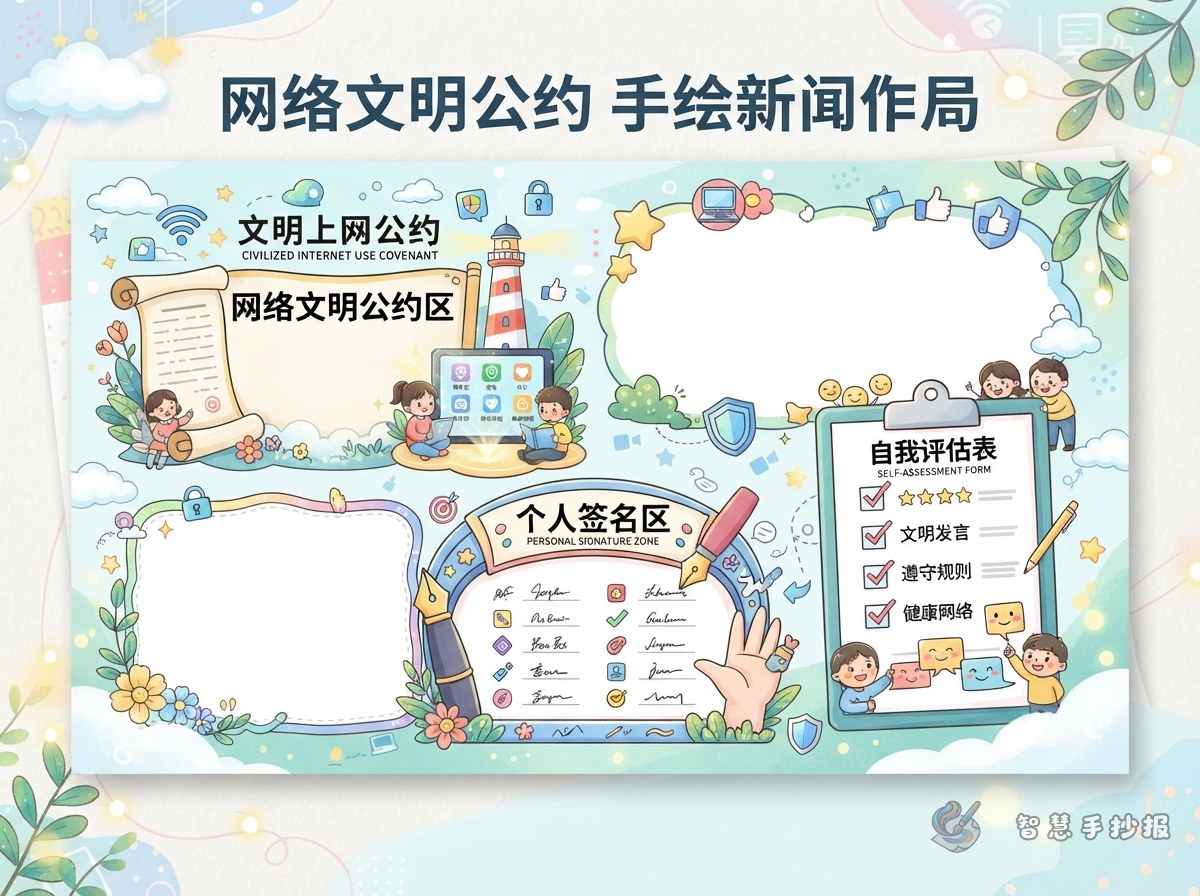
Four Zones That Fit on One Sheet
- Title band, about one fifth of the page. Write the pact title in large letters and link it with a dashed line to two or three small icons.
- Clause section, about two fifths. Use one or two columns, one clause per line, with a dot or a numbered circle in front.
- Signature and promise area, about one fifth. Draw around ten boxes or bubbles for names, fingerprints, or one-line promises.
- Self-check row, about one fifth. Add small squares with lines like “no endless scrolling today” or “no arguing with strangers today.”
Separate the zones with lines of different thickness rather than one uniform grid. If the clauses need more room, drop the self-check row and enlarge the signature area.
Make the Signature Area the Centerpiece
- Fingerprint plus name: a light fingerprint next to a signature looks livelier than a plain list.
- Speech bubbles: one short promise inside each bubble, such as “I promise not to add strangers.”
- Sticky-note shape: tilt a small note and “attach” it with a drawn pushpin or tape.
- Keep boxes big enough: one centimeter or more per side, otherwise nobody can write inside.
Ready-to-Copy Lines and Color Tips
- Good manners online, kind words in every chat.
- No strange links, no strange friends.
- There is a real person behind every screen name.
- Say please and thank you online too.
- My screen time is my decision.
- Useful small headings: Our Agreement, I Signed, Did I Do It Today, One Line About Being Online.
Use pale blue or soft green as the base, outline key clauses in a dark tone, and warm colors for the signature area. If you would rather skip the measuring and sketching, open the 智慧手抄报 mini program in WeChat, choose a cyber safety and responsible internet use template, and drop your own clauses and lines into the zones.