Turn the Poster into a Robot Mission Map
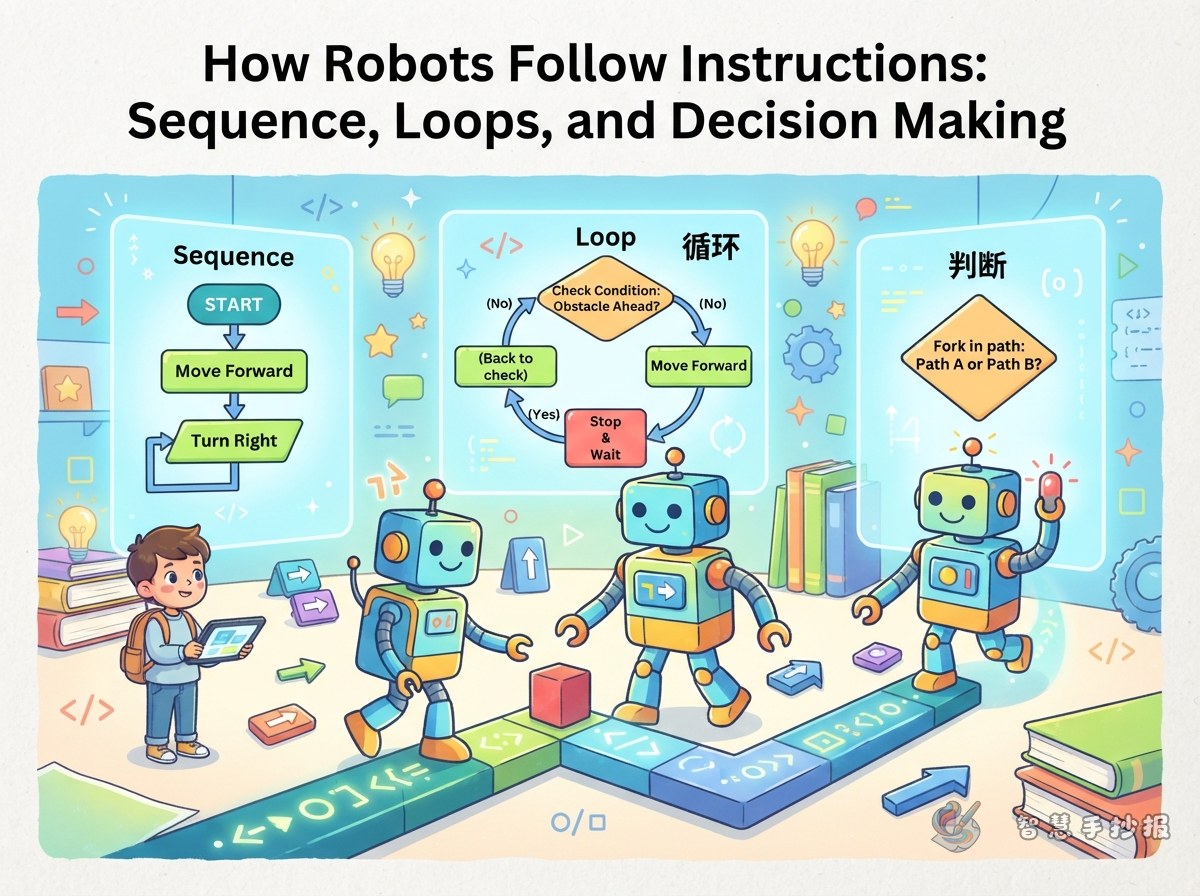
Build the whole poster around a robot traveling from a starting point to a goal. Place the main title at the top, draw a path with arrows through the center, and arrange three key sections—sequence, loops, and decisions—along the route. This structure helps readers follow the robot's instructions step by step.
Explain the Three Building Blocks
Sequence: Instructions in the Right Order
A sequence tells the robot what to do first, next, and last. For example: move forward two spaces, turn right, and pick up a block. Number the steps and add footprints or arrows so the order is easy to see.
Loops: An Easy Way to Repeat Actions
If a robot must clap five times, there is no need to write the same command five times. Write “repeat clapping 5 times” instead. A circular arrow is a simple visual symbol for a loop.
Decisions: Choosing by Checking a Condition
A decision can be written as: “If there is an obstacle ahead, turn left; otherwise, keep moving.” Show this idea with a forked road, a question mark, and two branches labeled yes and no.
Short Facts to Add to the Poster
- Program: A set of instructions arranged to complete a task.
- Algorithm: Clear steps used to solve a problem.
- Debugging: Finding, correcting, and testing mistakes in instructions.
- A good program: It has clear steps, gives the correct result, and avoids unnecessary commands.
A useful slogan is: “Break a big task into small steps, and a difficult problem becomes clearer.” Place it in a colorful box near the center of the poster.
Add a Robot Challenge
Create a small “Help the Robot Get Home” activity in one corner. Draw a square grid with a robot, a destination, and an obstacle. Ask readers to plan a route using commands such as move, turn, repeat, and if. More than one answer may be possible; the purpose is to practice turning a goal into ordered instructions.
Make the Layout Easy to Read
- Use blue, orange, and green to distinguish sequences, loops, and decisions.
- Decorate with gears, circuits, arrow keys, and small robots without covering the text.
- Sketch the title, fact boxes, and activity area in pencil before adding ink and color.
- Write in short sentences and highlight key terms with bold lettering or colored labels.
After planning the draft, students and parents can continue choosing a layout and organizing the sections in the 智慧手抄报 WeChat mini program.