Explain the word “algorithm” in kid-friendly language
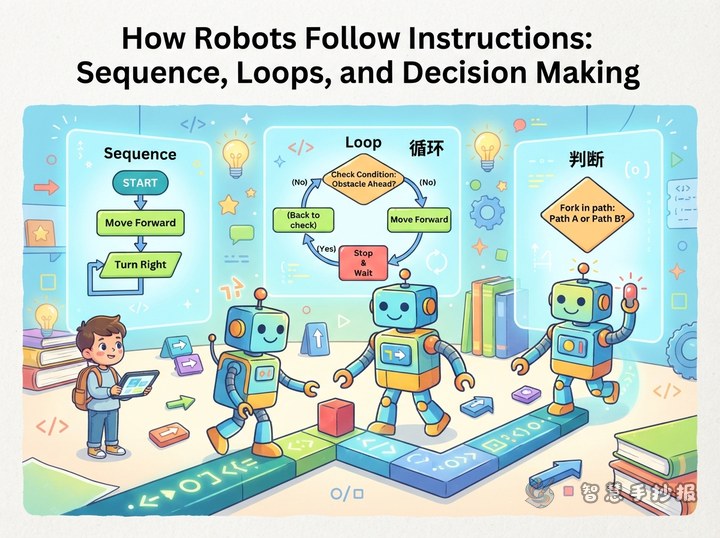
Many children think an algorithm is something mysterious inside a computer. In fact, an algorithm is just a set of steps in a certain order. For the poster, open with three short lines: what we do first, what we do next, and what we do when the situation changes. This is accurate and easy to copy neatly.
Choose a friendly title, such as “Algorithms Around Us”, “One Step at a Time” or “A Walking Idea”. Leave a line under the title for the student's name and class, which keeps the top of the page tidy.
Four everyday algorithms worth drawing
Pick routines that children actually do, so they always have something to write and something to draw.
- Getting ready for school: get up, get dressed, brush teeth, eat breakfast, check the bag, leave home. Draw six small boxes and link them with arrows.
- Sorting a school bag: group by subject, order by size, then check what is needed for tomorrow. This works well as a set of stacked drawers.
- Guessing a number: guess the middle number between 1 and 100, then use “too high” or “too low” to shrink the range. It shows what a decision step does.
- Making instant noodles: open the packet, add seasoning, pour hot water, wait three minutes, stir. Few steps, strong images, perfect for a corner illustration.
Add one short conclusion under each example, such as “Change the order and the result changes.” It looks better than copying a long definition.
Let the steps shape the layout
The great advantage of this topic is that it already has a natural order, so avoid splitting the page into four equal blocks. Instead, run one main path through the paper.
- Central flow chart: draw four to six boxes down the middle and connect them with arrows, using the most complete example.
- Definition corner: use a cloud shape for “An algorithm is a set of steps that solves a problem”, kept under thirty words.
- Comparison corner: show the difference between doing a task with steps and doing it without, in two short lines.
- Material strip along the bottom: split it into two columns, one for everyday examples and one for a small challenge the reader can try.
- Decorations: gears, a mouse, a small robot or footprint arrows all work. Keep to three colours so the text stays clear.
Short lines students can copy
- An algorithm solves a problem step by step.
- Order, decisions and repetition are the three helpers of an algorithm.
- Break a big problem into small ones and move forward one step at a time.
- Algorithms are all around us; we simply do not notice them.
- The clearer the steps, the easier they are to teach to someone else.
When copying, highlight key words such as “order”, “decision” and “repetition” in the same colour so readers spot the main points at a glance.
Order of work and three easy-to-miss details
- Sketch the grid on rough paper in pencil and decide how much space each section needs.
- Write the main title and section titles first, then fill in the body text so the page stays balanced.
- Write the text lightly in pencil, check for mistakes, then go over it with a black pen.
- Add arrows, boxes and borders last, using lighter colours so they do not compete with the writing.
Three details are easy to miss: leave a finger-width margin around the edge, keep the body text the same size throughout, and step back to check the whole page when finished. If the main path is clear at first glance, the layout has worked. To save time on formatting, the finished text can be placed into a template in the WeChat mini program Smart Handwritten Poster, choosing the columns and borders there, and leaving the decorations for hand drawing.